
Avinash Vagh
Most AI cartoon generator tools solve the wrong problem.
They turn a selfie into a cartoon. They make one avatar. They generate a cute image. That is useful, but it is not what serious video creators need.
If you are building a faceless YouTube channel, a kids story channel, an anime-style Shorts series, or a regional cartoon storytelling page, one image is not enough. You need scenes, characters, voiceover, captions, pacing, music, and a final video.
That is where an AI cartoon video generator becomes more useful than a photo cartoonizer.
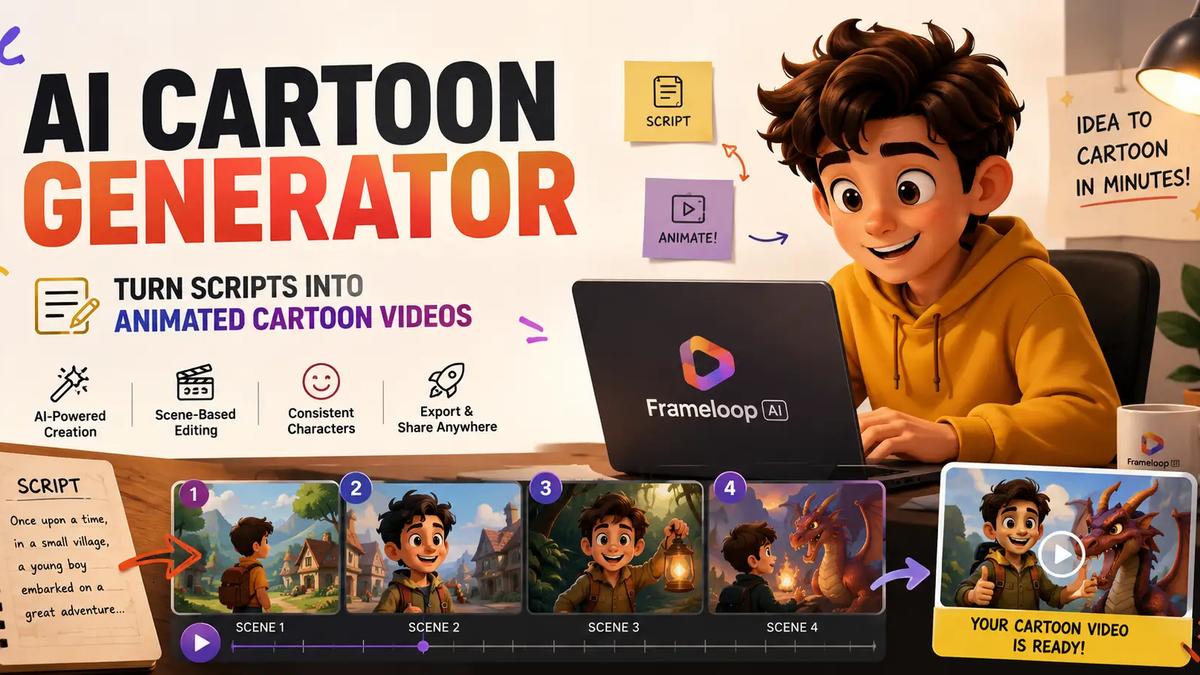
With Frameloop’s AI cartoon generator, you can start from a script or idea, choose a cartoon or anime-inspired style, generate scenes, add narration, apply captions, and refine the video before publishing.
The timing is right. Grand View Research estimates the AI video generator market will grow from $788.5 million in 2025 to $3.44 billion by 2033. Fortune Business Insights projects a similar category path, from $847 million in 2026 to $3.35 billion by 2034. Video is becoming cheaper to produce, but quality still decides who wins.
An AI cartoon generator is a tool that uses artificial intelligence to create cartoon-style images, characters, or videos from text, prompts, scripts, or visual references. For creators, the most valuable version is a cartoon animation maker that turns a written idea into a complete animated video.
The key is intent.
Someone searching for “turn photo into cartoon” usually wants a static effect. Someone searching for “ai cartoon video generator” wants a publishable video.
Those are different jobs.
A static AI cartoon tool creates:
A video-first AI cartoon generator creates:
This is why Frameloop focuses on script-to-video creation. The creator does not only want an image that looks cartoonish. The creator wants a story that moves.
A cartoon image is an asset. A cartoon video is a production system.
That system needs visual style, characters, narration, captions, music, scene timing, and export settings. Without those pieces, the creator still has to stitch together five different tools.
An AI cartoon video generator creates animated cartoon videos from scripts, ideas, or scenes. A photo cartoonizer turns one existing image into a cartoon-style picture.
This distinction matters for SEO, user intent, and product choice.
The head keyword “ai cartoon generator” has strong search demand, but much of that demand is split between image and video use cases. That is why creators should choose based on output, not the generic category name.
Use a photo cartoonizer when you need:
Use an AI cartoon video generator when you need:
The business case is stronger for video. HubSpot’s 2026 marketing data reports that short-form video, long-form video, and live-streaming are the top three ROI-driving content formats for marketers. YouTube also said Shorts averaged more than 70 billion daily views in 2024, which shows why creators care so much about fast, repeatable video production.
Static images can get likes. Short cartoon videos can build channels.
That is the difference.
To make an AI cartoon video, write a clear script, choose a cartoon visual style, generate scenes, add voiceover and captions, review character consistency, fix weak moments, and export the final video for YouTube Shorts, TikTok, Instagram Reels, or ads.
Here is the practical workflow:
Start with a visual idea. A cartoon video needs actions, emotions, and scenes, not abstract text.
Write the script. Keep the language simple and easy to narrate.
Choose the format. Use 9:16 for Shorts, TikTok, and Reels.
Pick a visual style. Cartoon, anime, 3D, cinematic, or illustrated styles create different expectations.
Generate the scenes. Let AI convert the script into visual moments.
Add voiceover. Choose a voice that matches the story and audience.
Add captions. Captions help retention, especially on mobile feeds.
Review the output. Check story flow, character consistency, pacing, and audio.
Fix weak scenes. Edit the scene instead of rebuilding the entire video.
Export and publish. Test hooks, thumbnails, titles, and posting times.
This is the simplest answer to “how to make an AI cartoon video,” but the difference between a weak video and a strong one comes from taste.
A good cartoon short usually has one clear idea. A character wants something. Something goes wrong. There is a payoff. The viewer understands the story even on mute.
Academic research on generative AI use in YouTube creation found that creators use AI across planning, scriptwriting, visual generation, audio creation, editing, and uploading. That is exactly why an all-in-one cartoon video workflow matters. The more steps you split across tools, the more friction you add.
An AI cartoon generator from text turns a written idea, prompt, or script into a cartoon-style video sequence. Instead of drawing or editing each shot manually, the creator gives the system a story, and the tool creates scenes from it.
This is the best workflow for faceless creators.
You can start with a simple idea:
“A poor boy finds a talking kite that helps him win a village festival.”
A text-to-video cartoon workflow can turn that into:
This is stronger than generating one cartoon image because stories need sequence.
Frameloop’s workflow is useful because it turns the script into a scene-based project. Creators can then refine the visual style, pacing, captions, voiceover, and individual scenes.
The visual styles library also matters here. Cartoon and anime-style content works best when the whole video feels like one world. Random style changes make the video look unfinished.
For regional creators, this text-first workflow is especially important. Search demand around AI cartoon video tools is strong in India, and creators often want Hindi, Bengali, Tamil, Telugu, or other regional story formats. A script-first video workflow lets creators focus on language and storytelling instead of manual animation.
The best AI cartoon generator is not the tool that creates the prettiest single image. The best tool helps you create a complete cartoon video with scenes, consistent characters, voiceover, captions, pacing, editing, and export-ready quality.
Use this checklist.
If the tool only outputs a cartoon image, it will not solve a creator workflow. A YouTube Shorts creator needs a video.
Look for an AI video cartoon generator that supports scenes, narration, captions, music, and final export.
The phrase “ai cartoon generator from text” matters because most creators begin with scripts, stories, hooks, or ideas. The tool should understand text and turn it into visual scenes.
Cartoon channels become memorable when characters repeat. If your hero looks different in every scene, the story breaks.
AI will create weak shots sometimes. That is normal. What matters is whether you can fix one scene without starting over.
Frameloop’s scene-based workflow is useful here because creators can review and adjust parts of the video instead of accepting the first output as final.
Creators need 9:16 exports, captions, hooks, and fast pacing for Shorts, TikTok, and Reels.
A free AI cartoon generator helps creators test story ideas before paying. This matters because most new channels do not know which format will work yet.
An AI cartoon character generator helps creators build recognizable characters that can appear across multiple scenes or videos. For episodic content, character consistency is one of the biggest quality signals.
Think about what makes a cartoon channel memorable.
It is not only the plot. It is the recurring hero, the same sidekick, the same villain, the same mascot, and the same visual world.
Consistent characters are useful for:
Frameloop’s character and scene workflow helps creators avoid one of the most common AI video problems: the character keeps changing. A face shifts. The outfit changes. The hair looks different. The age drifts. The audience notices immediately.
That problem matters even more in cartoons because characters are often simplified. Small changes in hair, clothing, colors, or proportions can make the character feel like someone else.
For story-first creators, Frameloop’s AI story generator pairs naturally with cartoon generation. You can build short narratives, recurring casts, and episodic formats without starting from a blank page every time.
An AI cartoon animation generator turns cartoon scenes into moving video. Motion, pacing, timing, voice, and captions are what make a cartoon feel alive.
A static cartoon image can look impressive, but it usually will not hold attention for long on a video platform.
Animated cartoon videos can include:
This is why keywords like “cartoon ai video generator,” “ai video cartoon generator,” and “ai cartoon animation generator” all point toward the same deeper need: creators want cartoon videos that move.
The advantage of using Frameloop’s AI animation video generator alongside cartoon styles is that you can think in scenes. You are not only making assets. You are building a finished viewing experience.
That matters for creators publishing every week.
One cartoon can be made manually. A channel needs a repeatable production system.
A free AI cartoon generator is useful when you want to test a story format, visual style, or channel idea before spending money. The best free workflow lets you understand the output quality, not just create a locked preview.
Creators search for:
These queries all reveal the same concern: creators want to experiment without upfront risk.
That makes sense.
If you are starting a faceless channel, you do not know whether your first cartoon format will work. You may need to test folk stories, comedy, educational explainers, horror shorts, children’s stories, or motivational cartoons before you find the right lane.
Use a free plan to test:
Frameloop lets creators start free and then upgrade when they need more output, more control, or higher production volume through paid plans.
The smart move is not to stay free forever. The smart move is to use free creation to find a repeatable format before scaling.
An AI cartoon voice generator creates narration or dialogue for cartoon videos. Voice matters because viewers judge the quality of a cartoon almost instantly from the sound.
Bad audio makes good visuals feel cheap.
A cartoon voiceover should match the story:
Creators also search for “cartoon AI voice generator” because they want characters to sound distinct. This can help, but the safest approach is to keep voices clear, natural, and appropriate for the audience.
Captions are just as important.
Short-form viewers often start videos without sound. Captions help them understand the story immediately. They also support retention when the voiceover is fast, the language is regional, or the viewer is watching in a noisy environment.
YouTube’s AI disclosure guidance says creators generally do not need to disclose AI used for productivity tasks like scripts or captions, and unrealistic animated content is treated differently from realistic altered media. But creators should still review platform rules, especially if AI content could be mistaken for real people, places, or events.
For cartoon videos, the practical rule is simple: keep the content clear, safe, and honest.
The AI cartoon trend is the use of AI to turn photos, prompts, scripts, and ideas into cartoon-style content for social platforms. The stronger long-term opportunity is not one-off cartoon selfies, but repeatable cartoon video formats.
Selfie cartoon filters are easy. That is why they spread quickly.
But creator businesses are not built on one-time filters.
They are built on repeatable formats:
The video version of the AI cartoon trend has more leverage because videos create watch time, subscribers, shares, and repeat viewing.
DataReportal’s Digital 2026 India report says Google’s ad tools showed YouTube had about 500 million users in India in late 2025. That makes regional cartoon storytelling a serious opportunity, not just a small creator experiment.
The creators who win will not be the ones generating random cartoon clips. They will be the ones building repeatable characters, formats, and story worlds.
AI cartoon videos work best when the idea benefits from simplified visuals, expressive characters, and fast storytelling.
Faceless creators can use cartoon characters to tell stories without appearing on camera. This works for moral stories, mystery, history, education, comedy, and regional content.
Short cartoon videos can hook viewers quickly because color, motion, and expression are easy to understand. Use vertical format, captions, and a clear first scene.
Cartoon visuals are a natural fit for children’s stories, songs, lessons, and simple character-led scenes. Keep pacing gentle and the language clear.
Hindi, Bengali, Tamil, Telugu, Spanish, and other language creators can create cartoon stories for audiences that may be underserved by high-quality animation.
Brands can use cartoon characters to explain complex features, onboarding steps, or customer pain points in a more approachable way.
Recurring characters and worlds help viewers remember the channel. This is where an AI cartoon character generator and consistent visual styles become especially valuable.
Choose Frameloop when you want to turn a script into an animated cartoon video. Choose a photo cartoonizer when you only want to turn a picture into a cartoon image.
That is the cleanest decision.
Tools like Canva, CapCut, Vidnoz, Animaker, Renderforest, InVideo, DomoAI, Pika, Runway, and Luma AI can all be useful depending on the job. Some are better for templates. Some are better for editing. Some are better for raw generation. Some are better for avatars.
Frameloop is strongest when the goal is a creator workflow:
If you want a one-time cartoon portrait, use an image tool.
If you want a cartoon content engine, use a video-first workflow.
The AI cartoon generator market is crowded because cartoon filters are easy to understand.
But filters do not build channels.
If your goal is animated cartoon videos, faceless stories, regional content, product explainers, or episodic characters, start with the script. The script gives the cartoon a reason to exist. The scenes give it structure. The voice and captions make it watchable. The style makes it memorable.
Frameloop helps you move from idea to animated cartoon video without stitching together five separate tools.
You can write the story, choose the style, generate scenes, refine the output, and publish a cartoon video built for social platforms.

Got great video ideas but need help bringing them to life? Frameloop AI makes it easy to create professional faceless videos with AI-generated visuals, voiceovers, and editing.
Try Frameloop AI For Free